How to Write Technical Documentation That Gets You Hired
Let's be honest, writing technical documentation is more than just a box-ticking exercise. It’s a core competency that involves careful planning, clear writing, and knowing your way around modern publishing tools. When you master this, it’s not just a nice-to-have skill—it's a direct investment in your career. Hiring managers notice this stuff, and it can be the deciding factor in a job offer.
Why Great Documentation Is a Career Superpower

Learning to write great technical documentation isn't about becoming a grammar expert. It's about developing a strategic skill that makes you incredibly valuable. In any tech company, and especially in the breakneck world of Web3, solid documentation is the foundation for efficiency and growth. Think of it as the bridge connecting a groundbreaking product with the developers who actually need to use it. When you produce top-notch docs, you’re actively solving expensive business problems—and that’s the kind of perspective that makes you stand out in a job interview.
Connecting Documentation to Business Impact
Hiring managers aren't just looking for a writer; they're looking for a problem-solver who understands business goals. Your ability to create excellent documentation translates directly into tangible results that get the attention of both leadership and engineering teams. Frame your skills in these terms during an interview.
Here's how to articulate the business value of your work:
- Faster Developer Onboarding: Good docs are like an automated tour guide for new engineers, drastically cutting down the time senior devs have to spend answering repetitive questions. In an interview, you can frame this as: "I create resources that help new developers contribute to the codebase in days, not weeks, which directly accelerates our product roadmap."
- Lower Support Costs: When developers can self-serve, they don't clog up the support queue. This frees up the support team for high-priority issues and directly reduces operational costs. Tell a hiring manager, "My goal is to create documentation so clear that it deflects common support tickets, saving the company money."
- Higher Product Adoption: Clear guides and API references make a product less intimidating and easier to adopt. If a developer is choosing between two similar protocols, the one with the better documentation almost always wins. This is a direct driver of growth.
The impact on support is huge. A recent industry survey found that 72% of companies saw their customer support requests fall by at least 20% after they improved their documentation. You can dig into more of these technical documentation trends and their impact to see the data for yourself.
How This Skill Shapes Your Career Trajectory
Mastering technical documentation opens doors to senior and leadership roles. It demonstrates systemic thinking, user empathy, and the ability to explain complex topics with clarity. These aren't just writing skills—they're the bedrock of high-impact roles like Developer Advocate, Senior Technical Writer, Content Strategist, and even Product Manager.
Imagine walking into an interview and being able to say, "The documentation I wrote for my last project cut developer onboarding questions by 30%." That’s a powerful, metric-driven statement. It proves you see the big picture: documentation isn't an afterthought; it's a strategic asset that helps the business succeed. This is exactly the mindset that separates top candidates from the rest.
Building Your Documentation Plan Like a Strategist
Great documentation doesn't just happen. It's planned. Starting with a solid strategic plan is the secret sauce, and frankly, it's a skill that sets you apart in a job interview. It shows you think beyond just writing words on a page. When you can articulate your planning process, you demonstrate that you can think like a product owner, not just a writer. You're not just describing features; you're building a resource that helps people succeed.
Define Your Audience with Precision
Before you write a single sentence, you have to get almost obsessive about who you're writing for. "Developers" is too broad and shows a lack of strategic depth to a hiring manager. A junior dev diving into Web3 for the first time needs something completely different than a seasoned smart contract architect.
Creating practical user personas is an excellent way to demonstrate this skill in a portfolio or interview:
- Persona A - The Newcomer: Imagine a front-end developer, new to blockchain. They need to figure out how to connect a wallet to your protocol. For them, you'll need crystal-clear, step-by-step guides, copy-pasteable code snippets, and simple explanations of core concepts.
- Persona B - The Veteran: Now picture a senior smart contract engineer evaluating your protocol for a new DeFi app. They don't need hand-holding. They're looking for high-level architectural diagrams, a thorough API reference, and deep dives into your security model and gas optimization strategies.
Walking through this process in an interview shows you understand that one-size-fits-all documentation fails. It proves you're thinking strategically about who you're helping and how to provide maximum value, which is a key trait for senior roles.
Choose the Right Information Architecture
Once you know who you're talking to, you need to decide what to write and how to organize it. This is your information architecture—the blueprint that ensures users find what they need without frustration. When discussing your portfolio, explain why you chose a specific structure.
Most technical docs fall into one of three buckets:
- Tutorials: Learning-focused, hands-on guides like "How to Deploy Your First Smart Contract." The goal is a quick win to build user confidence.
- How-To Guides: Laser-focused on solving a single, specific problem, like "How to Resolve a Transaction Nonce Error." This is practical, problem-solving content.
- Reference Docs: The factual, nitty-gritty details. API references, lists of error codes, or function descriptions. The user wants to get in, find a specific fact, and get out quickly.
The biggest mistake I see is people mixing these formats. A tutorial cluttered with dense reference material is a slog to get through. A reference doc that tries to be a tutorial is just plain frustrating. Keep them separate. Your users will thank you.
When presenting your work, frame your architectural decisions strategically: "For this project, I led with a tutorial-first approach to quickly onboard new developers. We supported that with a searchable how-to section for common problems and a comprehensive API reference for power users." That kind of explanation shows you have the strategic mindset needed for roles like this senior content strategist position, where architecture is a huge part of the job. Your ability to plan demonstrates you're a strategic thinker, not just a writer.
Mastering the Docs-as-Code Workflow
To truly excel and land a top-tier technical writing job, you have to think like a developer. The writers who command the highest salaries are embedded within engineering teams, using the same tools and workflows. Their secret? The docs-as-code workflow.
Mastering this is non-negotiable if you're aiming for a senior position. It means treating documentation with the same discipline developers apply to code: writing in plain text, using version control, and automating publishing.
The Pillars of the Docs-as-Code Approach
When you can walk into an interview and confidently discuss this workflow, it sends a clear signal: you can integrate with an engineering team on day one. You're not a bottleneck; you're an accelerator.
Here’s what that looks like in practice:
- Writing in Markdown: Everything is written in a lightweight markup language, usually Markdown. It’s simple, plain-text, and platform-agnostic, making collaboration and version tracking seamless.
- Version Control with Git: Your documentation lives in a repository—typically on GitHub or GitLab—right alongside the product's source code. You'll use Git to create branches, submit pull requests for review, and merge changes, just like a developer.
- Automated Publishing (CI/CD): Once your changes are merged, a Continuous Integration/Continuous Deployment (CI/CD) pipeline automatically builds your documentation site and deploys it live. No more manual uploads.
When a hiring manager sees "hands-on experience with docs-as-code, including Git workflows and CI/CD pipelines" on your resume, they see someone who gets it. You're not just a writer; you're a technical partner who understands how modern tech teams operate. It’s a massive green flag that can set you apart from other candidates.
Before you even start writing, a solid strategy is crucial. This simple flow shows how the best documentation projects are planned.
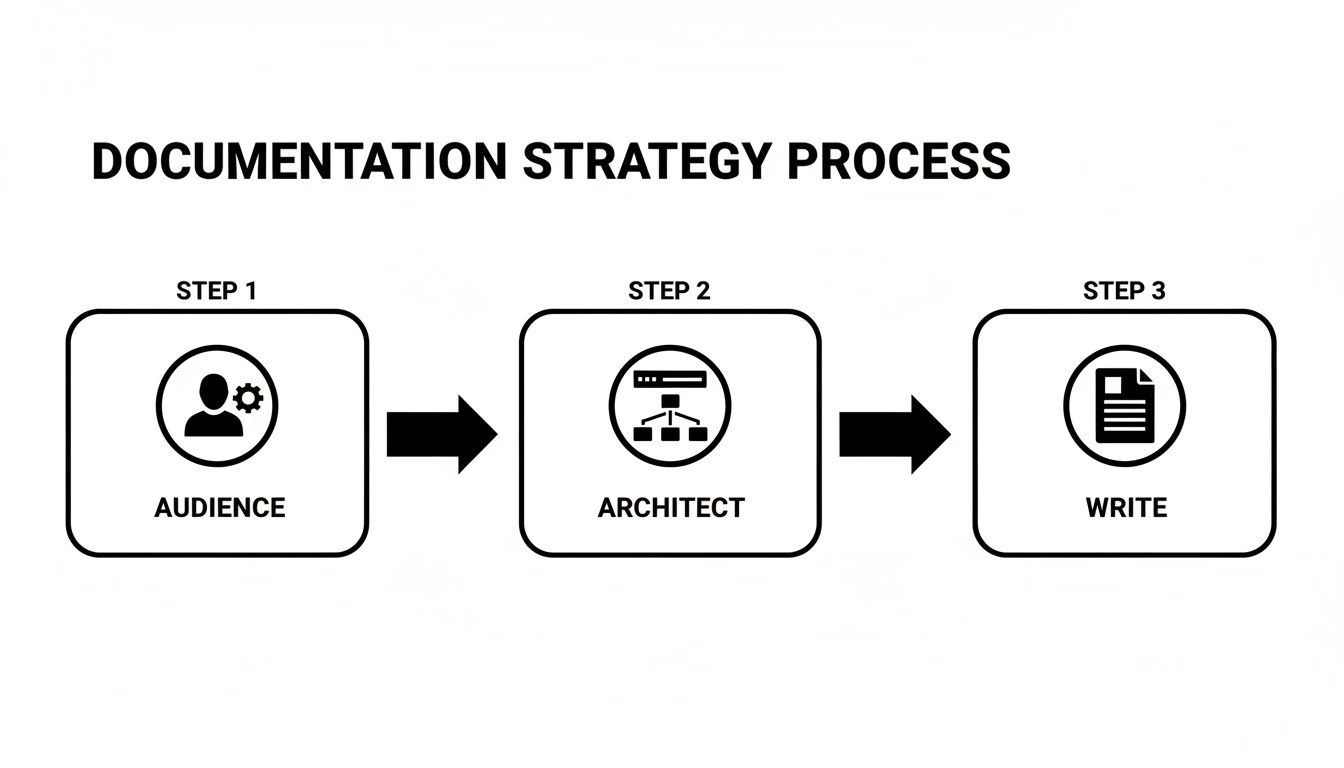
It all starts with understanding your audience and architecting the information. Only then can the writing truly begin.
Choosing Your Docs-as-Code Toolkit
The engine behind modern documentation is the static site generator (SSG). These tools transform your Markdown files into a professional website. Knowing which SSG to use—and being able to justify that choice in an interview—is a key skill that demonstrates technical decision-making.
Here’s a comparison of popular tools to help you select the best fit for your project and career goals.
| Tool | Primary Use Case | Key Features | Best For Your Portfolio When... |
|---|---|---|---|
| Docusaurus | Content-heavy documentation sites, blogs | MDX support (React in Markdown), versioning, localization | You want to showcase your ability to build a comprehensive, polished documentation portal for a complex project. |
| Hugo | Speed and flexibility | Extremely fast build times, powerful templating | You need to demonstrate you can handle a massive site with thousands of pages without sacrificing performance. |
| MkDocs | Simple, clean documentation | Easy configuration with YAML, large plugin ecosystem | You want to quickly spin up a clean, professional-looking site for a smaller project or API documentation. |
| Next.js | Hybrid static & server rendering | React framework, server-side rendering, API routes | You are documenting a project built with React and want to show deep integration with the front-end stack. |
There's no single "best" tool, only the right tool for the job. Getting hands-on with one or two of these gives you a massive advantage and something tangible to showcase to potential employers.
How to Turn This Knowledge into a Job Offer
Theory is great, but practical experience gets you hired. So, how do you get it?
Start building. Pick an open-source project, fork its repository, and try building its documentation locally using a tool like Docusaurus. Even better, find a gap in their existing docs—a missing explanation, an outdated code snippet—and fix it. Submit a pull request.
Document this experience for your portfolio with a short case study: "How I Improved the Documentation for Project X Using a Docs-as-Code Workflow."
Imagine having this story in an interview. You can say:
"I noticed their quickstart guide was missing a crucial step for Windows users. I cloned the repo, created a new branch, wrote the new section in Markdown, and submitted a pull request. The maintainers reviewed and merged it, and the changes were live within minutes thanks to their CI/CD pipeline."
A single, concrete story like that is worth more than a dozen bullet points on a resume. It proves you can walk the walk. You’re not just someone who writes about tech; you're a modern technical communicator ready to contribute from day one.
Writing Content That Developers Actually Use

You've got a plan and a modern workflow. Now for the most important part—the part that actually gets you the job: writing content that developers genuinely find useful. This is where you move beyond just describing things and start actively helping people succeed.
Bad documentation is a project-killer. Your job is to be the antidote. You’re not just a writer; you're building a resource that anticipates questions and solves problems. When a hiring manager sends you a writing test, this is exactly what they're looking for. Can you make a developer’s life easier?
Crafting Crystal-Clear Overviews
Think of the "getting started" guide as the front door to your project. It’s where a developer decides—in just a few minutes—if they’re going to invest their time. Your mission is to nail three questions in under five minutes:
- What is this thing? Get to the point in one or two sentences. No marketing jargon.
- What problem does it solve? Give them immediate context for why this project exists.
- How do I use it? Show, don't just tell. A minimal, copy-pasteable "hello world" example is perfect for delivering an instant win.
This first impression is critical. Keep paragraphs tight, bold key terms, and link out to deeper dives. A developer who has an "aha!" moment upfront is a developer who will stick around.
Building Tutorials That Teach
Tutorials are where real learning happens. You're guiding a developer from "I have no idea" to "I just built something." A great tutorial is a hands-on experience designed to build confidence and competence.
Every great tutorial tells a story with a clear beginning, middle, and end. It should focus on a single, tangible outcome, like "Deploying Your First ERC-20 Token."
Here’s a checklist for writing tutorials that will impress any hiring manager:
- State the Goal Upfront: Tell them exactly what they’ll have accomplished by the end.
- Provide Complete Code Snippets: Give them full, working code they can copy and run, then explain what each part does.
- Explain the "Why," Not Just the "How": It’s not enough to say "call this function." Explain why it's necessary and what role it plays. This demonstrates deeper understanding.
- Show the Expected Output: After a code block, include a screenshot or text block showing a successful result. This helps users verify they’re on the right track.
Pro Tip: In an interview, talk about how you structure tutorials to deliver a "quick win." Explaining that you focus on building user confidence first and then layer in complexity shows you understand the psychology of how developers learn. It's a huge plus.
Structuring Reference Guides for Scannability
While tutorials are for learning, reference guides are for doing. When a developer hits your API reference, they need an answer fast. Scannability is everything.
You need a predictable, consistent structure for every entry. For an API endpoint, that usually means:
- Endpoint Name and Method: e.g.,
GET /v1/transactions - Description: A one-sentence summary of what it does.
- Parameters: A table is perfect. List each parameter, its data type, and whether it’s required.
- Example Request: A full, copy-pasteable request.
- Example Response: The full JSON response they should expect.
Nobody reads reference documentation for fun. They scan for what they need. Use tables, code blocks, and clear headings to make information jump off the page. This skill is critical for roles blending writing with community support, like in this developer relations content role, where clarity and speed are key. Mastering these three formats—overview, tutorial, and reference—makes you an invaluable asset to any technical team.
Using AI as Your Documentation Co-Pilot
To stay ahead in your technical writing career, you have to work smart. That means treating generative AI not as a replacement, but as an incredibly powerful assistant. When you learn how to steer these tools effectively, you become a faster, more strategic, and far more valuable writer.
In your next job interview, being able to explain how you leverage AI to accelerate your workflow shows you're not just following trends—you're actively finding ways to ship better documentation, faster. It positions you as a forward-thinking professional who understands efficiency.
From Blank Page to Polished Draft
We've all stared at a blank page. This is where AI excels. You can feed it a technical spec or a chunk of code and ask it to spin up a structured first draft. This isn't your final copy, but it's a solid foundation. Instead of burning hours on basic structure, you can dive right into refining the language, clarifying complex points, and adding the nuanced human insights that make documentation truly great. This frees you up for more strategic work, like improving information architecture or crafting better code examples.
Practical AI Use Cases for Your Workflow
Weave AI into your process to multiply your own expertise. The key is to be the expert directing the tool.
Here are a few actionable ways to use AI that will impress a hiring manager:
- Summarizing Dense Information: Feed a long engineering document or meeting transcript into an AI and ask it to pull out key decisions and technical details. This is perfect for drafting release notes or an overview section efficiently.
- Refining Clarity and Tone: Paste in a section you’ve written and ask the AI to "simplify complex sentences," "switch to active voice," or "check for consistency against our style guide." It’s like having a tireless editor on call.
- Generating Code Snippets: This is a huge time-saver. Prompt it with, "Write a Python script that makes a GET request to this API endpoint and prints the response." The AI generates the boilerplate code, which you then verify, test, and annotate.
This isn't a hypothetical. The industry is already shifting. A recent survey showed about two-thirds of documentation teams are using generative AI for drafting and summarization, reporting productivity gains of 20–30%. You can explore the full technology industry outlook to understand how automation is reshaping the field.
Getting comfortable with these tools is a career necessity. When you can intelligently apply AI, you show that you know how to scale your impact. That’s the kind of value that gets you noticed, hired, and ultimately promoted.
Answering Your Biggest Career Questions
Breaking into technical writing or leveling up in your current role takes more than just being a great writer. You need a game plan for building your skills, proving your worth, and making smart moves in the job market. Getting these answers right can be what sets you apart in a competitive interview process.
How Can I Build a Technical Documentation Portfolio with No Experience?
This is the classic "need experience to get experience" dilemma, but it's completely solvable. Hiring managers just want proof you can do the work, not that you've held a specific title.
One of the best ways to start is by contributing to open-source projects on platforms like GitHub. Find a project you're interested in, search for issues tagged "documentation" or "good first issue," and jump in. Even fixing typos or clarifying a confusing sentence is a valid contribution you can point to.
You can also create your own portfolio projects from scratch:
- Document a simple API. Find a free public API and write a full documentation set for it, including a "Getting Started" guide, endpoint references, and code examples. This demonstrates core technical writing skills.
- Write a killer tutorial. Pick a popular tool and create a comprehensive guide that solves a real-world problem. Think "How to Set Up a Local Web3 Development Environment with Hardhat." This shows you can teach and empower users.
- Blog about what you're learning. Document your process of learning a new technology. This showcases your technical curiosity and communication skills simultaneously.
Each of these projects becomes a tangible asset that proves to employers you are proactive and passionate about the work.
What Are the Most In-Demand Skills for Technical Writers Today?
It's not just about strong writing anymore. The best technical writers today are a hybrid of a writer, a developer, and a product manager. Companies want technical communicators who can integrate seamlessly into an engineering workflow.
Here’s what’s really in demand on job descriptions:
- Docs-as-Code Proficiency: This is non-negotiable. You need to be comfortable with Git for version control, writing in Markdown, and understanding how CI/CD pipelines work.
- Tooling Expertise: Get hands-on with static site generators like Docusaurus or Hugo. Knowing your way around API documentation tools like Swagger/OpenAPI or Postman is also a huge plus.
- Code Literacy: You don't have to be an expert coder, but you must be able to read and understand code in at least one common language like JavaScript or Python. This is critical for writing accurate examples and earning the trust of developers.
- Strategic Thinking: Top candidates are masters of information architecture and audience analysis. Knowing how to structure content for different user needs is what separates a senior writer from a junior one.
Making sure these skills are front and center on your resume and in your interview answers will get you noticed.
Pro Tip for your next interview: don't just list the tools you know. Explain how you used them to solve a problem. For example, "I used Docusaurus to implement docs versioning, which let developers easily switch between different API releases and reduced confusion."
How Do I Prepare for a Technical Documentation Job Interview?
A tech writing interview is a practical test of your skills and thinking process. Preparation is everything.
First, be ready to deep-dive into your portfolio. For every piece, explain your process. Why did you choose that structure? How did you define the audience? What was the biggest challenge, and how did you solve it? This is your chance to show your strategic thinking.
Next, brace for a writing test. This could be anything from documenting a fictional API to editing a poorly written document. They want to see your ability to bring clarity and accuracy to a complex topic under pressure. Many companies are also looking for specific domain knowledge. For instance, technical writer jobs in the blockchain space will require a blend of writing prowess and Web3 understanding.
Finally, do your homework on the company. Read their existing documentation before the interview. Show up with specific, thoughtful feedback. Tell them what they're doing well, but also identify one or two clear opportunities for improvement. This shows you're not just looking for any job—you're already thinking like a valuable member of their team.
At Blockchain Jobs, we connect talented professionals with the most exciting opportunities in the Web3 ecosystem. Whether you're a seasoned technical writer or just starting your career, find your next role with us at https://blockchain-jobs.com.