Hiring UI Designers in 2026: A Guide for Web3 Teams
Hiring a UI designer in 2026 is not what it used to be. It’s no longer about finding someone who can just make things look good. Today, especially for Web3 projects, you need a designer who deeply understands the interplay between user experience, AI tools, and Web3 principles. To succeed in this competitive hiring landscape, you must find talent who can build intuitive, secure interfaces for a decentralized future, moving far beyond traditional design skills.
The New Playbook for Hiring a UI Designer
The days of posting a generic job description and hoping for the best are over. If your team is building a DeFi platform, an NFT marketplace, or a DAO governance portal, you need a new hiring playbook. The market has shifted. Mastery of tools like Figma is now just the baseline. The best designers being hired today are those who can integrate decentralization, tokenomics, and user security into their very first wireframes.
What does this mean for you as a hiring manager? It means your search criteria and interview process must evolve. You’re not just hiring for visual skills; you're looking for a strategic partner who can navigate the unique challenges of a decentralized ecosystem. This requires a deeper interview process—one that rigorously tests their grasp of blockchain concepts and their ability to translate complex technology into simple, beautiful user experiences.
The Modern UI Designer Skill Set for Career Growth
For designers aiming for top-tier roles, the career path is clear: specialize and adapt. Yes, the fundamentals of typography, color theory, and layout are still non-negotiable, but they are now the price of entry. The designers who are truly advancing their careers have layered specialized Web3 knowledge on top of that solid foundation.
From a hiring perspective, here is what separates a good candidate from a great one:
- Web3 Contextual Awareness: Can they design around constraints like gas fees, wallet connections, and transaction signing? A great designer creates flows that make these technical hurdles feel almost invisible to the user. This is a key area to probe in an interview.
- AI Tool Proficiency: Top candidates aren't just experimenting with AI; they are using it strategically to accelerate their workflow—generating design variations, creating smart placeholder content, or prototyping generative interfaces. This is now a standard part of the professional toolkit.
- Systems Thinking: Building dApps requires creating reusable components and systems. A candidate who demonstrates a systems-first mindset in their portfolio is prepared for the scalability challenges of Web3 products.
The job market absolutely reflects this shift. As of 2026, the digital design field in the United States has around 214,900 active positions, with projections for 7% growth over the next decade. Salaries are equally impressive, with senior roles commanding over $124,000—especially for designers who can expertly blend traditional skills with emerging tech.
"The biggest change I've seen in candidates is in their mindset. We’ve gone from designing static pages to creating dynamic, stateful experiences that interact directly with smart contracts. In an interview, a designer who can't articulate this shift is a red flag—they'll only be able to put a pretty skin on a complex system."
This guide will help you navigate this new world, whether you're a founder assembling a team or a designer planning your next career move. We'll cover everything from writing a job description that attracts top talent to running effective interviews. To see these new requirements in action, examine current job posts like this Web3 Creative Designer role.
How to Write a Job Post That Attracts Top Web3 Designers
A generic job description is a magnet for generic candidates. When hiring a UI designer for a Web3 project, your job post is your most important filter. It must do more than list software skills; it must resonate with the ambitious, problem-solving designers who are genuinely passionate about decentralization and looking for a career-defining role.
Treat your job description as a marketing document for the role. Ditch corporate jargon and use language that speaks to designers who are excited by the unique challenges of Web3, like designing for complex tokenomics or seamless cross-chain experiences. This is your first opportunity to show that your team "gets it."
Frame the Role Around Problems, Not Tools
Top-tier UI designers are not just looking for a job; they are hunting for their next significant career challenge. A list of "must-haves" like "Proficiency in Figma, Sketch, and Adobe Creative Suite" is noise—those skills are table stakes.
Instead, frame your requirements around the problems the candidate will solve.
Instead of this:
- Must have 5+ years of UI design experience.
- Proficient in Figma.
Frame it this way for actionable hiring:
- "Design elegant and intuitive interfaces for our DeFi lending protocol, simplifying complex user flows like collateral management and liquidation monitoring."
- "Take full ownership of our design system, ensuring our visual language is consistent, scalable, and beautifully executed across our entire dApp and marketing presence."
This shift in framing does two critical things for your hiring process. First, it gives a candidate a clear picture of their day-to-day impact. Second, it filters for a problem-solving mindset, attracting candidates motivated by challenge rather than a simple skills checklist.
"Your job description is your first interview question. If a candidate is energized by the complex problems you've laid out, they are already a better cultural and professional fit than someone who just ticked off the skills boxes. It signals that this role is about impact, not just pushing pixels."
The design talent market is fierce. After a tough period of layoffs, design job postings recently surged by 60% year-over-year in 2025. For Web3 companies, this means the talent pool is larger, but so is the competition. Furthermore, hiring manager expectations have evolved: 73% now look for AI tool proficiency, and 79% seek expertise in AI product design. You can explore these hiring trends in Figma's latest report on the rising demand for designers.
Sell the Vision to Secure the Hire
Why should a brilliant designer choose your project over the countless others vying for their talent? The answer isn't just a bigger paycheck (though competitive compensation is crucial); it's your vision and culture. Your job description must sell the "why" behind the work to close the deal.
Get specific about what makes your project a great career move:
- The Mission: Are you building tools for financial sovereignty? Revolutionizing digital identity? Articulate the change you're trying to make.
- The Challenge: Frame your biggest design hurdles as exciting opportunities for a talented individual to make their mark and grow their skills.
- The Impact: Show candidates how their work will directly shape the product and user experience. Emphasize ownership from day one.
- The Team: Who will they learn from and collaborate with? Mentioning the expertise of your engineering and product leads is a huge draw for ambitious designers.
Focusing on these elements appeals to a designer's career ambitions and desire to contribute to something meaningful. It shows them this isn't just another job—it's a chance to be on the front lines of a new technological frontier.
Fish Where the Fish Are: Sourcing Top Talent
Once you’ve crafted the perfect job post, don't just throw it on LinkedIn. The most engaged, Web3-native talent congregates in specific corners of the internet.
To effectively source candidates, you need to go where they are. Spend time in niche communities where designers share their work and discuss trends. Platforms like Dribbble and Behance are excellent for proactive sourcing based on aesthetic alignment with your brand.
For the most efficient hiring, focus on specialized Web3 job boards. These platforms are goldmines for finding pre-qualified candidates. You can see how other projects are framing their roles and, more importantly, discover a curated pool of talented designers looking for Web3 roles who have already signaled their interest in the space.
Running an Interview Process That Reveals True Skill
Once you have promising applications, the real work of hiring begins. The interview is where you distinguish designers who create beautiful static screens from those who can solve complex problems and ship great products. A slick portfolio gets them in the door, but it’s their thinking process that will determine their long-term impact on your team.
Your entire interview process should be designed to uncover the story behind the work: the why behind their design choices, the messy journey from problem to solution, and the measurable results their work achieved.
Deconstructing the Portfolio: An Interviewer's Guide
A portfolio review should be an interactive deep dive, not a passive presentation. It's easy for a candidate to click through polished final screens, but your job as an interviewer is to pull back the curtain and see the process.
Go beyond generic questions like, "What was your role on this project?" Instead, ask targeted questions that force them to show their work and thinking.
- "This final screen looks sharp. Can you walk me back to the early sketches or messy wireframes? I'd love to hear about the key decisions that led you from there to here."
- "Tell me about the user flow here. What specific data or user feedback drove the decision to simplify it in this way?"
- "Was there a point in this project where a technical limitation forced a design trade-off? How did you collaborate with the engineering team to find a solution?"
These questions reveal far more than a polished Dribbble shot. You are interviewing for evidence of collaboration, user empathy, and critical thinking—not just visual talent.
"For me, the most telling moment in any portfolio review is when a designer can confidently discuss a failure. When they explain a design that didn't resonate with users and articulate what they learned, you know you're speaking with a mature, self-aware professional ready for a senior role."
This simple visual breaks down how we get candidates to this stage in the first place—a mix of targeted posts, community engagement, and tapping into the right platforms.
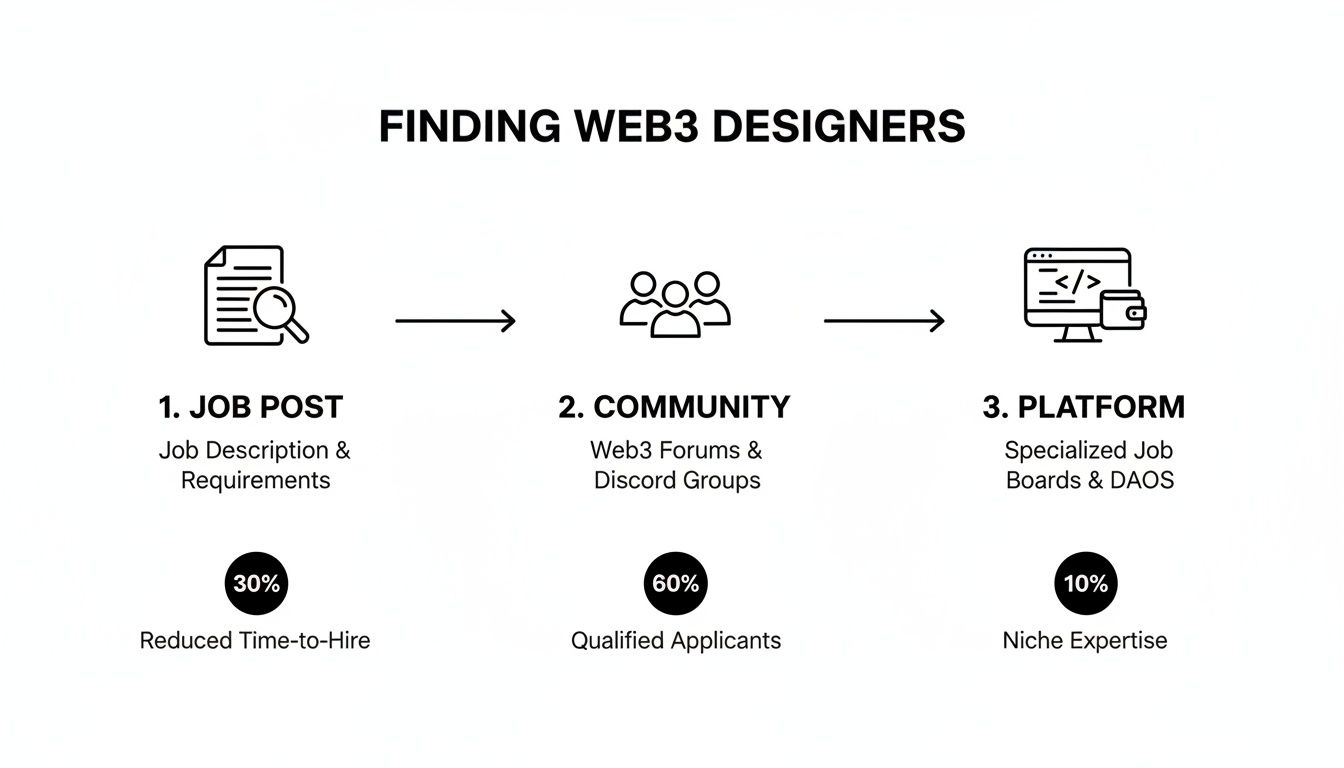
As you can see, sourcing designers already active in the Web3 ecosystem gives you a significant advantage before the interviews even begin.
The Take-Home Design Challenge: A Hiring Manager's Guide
The design challenge is a hotly debated hiring tool. Done poorly, they are exploitative and a waste of everyone's time. Done right, they can provide a unique glimpse into a candidate's real-world problem-solving skills that a portfolio review cannot.
If you choose to use one, follow these rules to make it fair and effective:
- Be realistic about time. Clearly state the task should take no more than 4-6 hours. This respects their time and tests their ability to prioritize under constraints.
- Pay them for their work. Always. Offer fair compensation, regardless of the hiring outcome. This is a non-negotiable sign of respect.
- Make it relevant. The challenge should mirror a real problem your team is facing. Abstract prompts are less useful for evaluation.
- Keep it focused. Don't ask them to solve everything. The task should test a specific skill, like simplifying a complex user flow or improving an existing UI component.
For example, a bad prompt is "Redesign our homepage." A much better one is: "Our data shows users are dropping off when trying to understand staking rewards. Sketch out a UI solution (low-fi is fine) and include a brief note explaining your design rationale." This provides a clear window into how they tackle a genuine business problem. You can get a feel for how to frame these by studying how other Web3 companies write their job descriptions, like this UI/UX Motion Designer job posting.
Live Whiteboarding for Real-Time Problem Solving
A great alternative (or addition) to a take-home task is a live whiteboarding session. This is my preferred method for assessing senior candidates. In about an hour, you can learn a tremendous amount about how a designer thinks on their feet, communicates ideas, and collaborates.
Present them with a relevant problem, such as "How would you design a UI for a user to manage multiple wallet addresses in one dashboard?" Then, work on it together.
Observe their process. Do they start by asking clarifying questions? Do they sketch user flows before jumping into UI details? The goal is not a pixel-perfect design. You are evaluating their problem-solving process, their communication style, and whether you would enjoy tackling tough challenges with them as a colleague. It is a powerful predictor of future team dynamics and performance.
Making Fair and Confident Hiring Decisions
You've finished the final interviews. Now comes the most critical step: making an intelligent, objective hiring decision. Relying on gut feelings and scattered notes opens the door to bias and hiring mistakes. A standardized evaluation rubric is not just bureaucracy—it is your best tool for making a fair and defensible choice.
A good scorecard aligns the entire hiring panel. It forces the team to assess every candidate against the same set of critical skills, providing a clear, data-driven framework for comparison and justifying the final decision.
Building Your Evaluation Scorecard for UI Designers
To make a hire you won't regret, you need a system. A simple scorecard, shared across the hiring team, is the best way to turn subjective interview impressions into structured, comparable data. It anchors the post-interview discussion on what truly matters for the role.
For a Web3 UI designer, I recommend building your scorecard around these four pillars:
- Visual Design Craft: How strong are their fundamentals? Evaluate their mastery of typography, color theory, layout, and interaction design. Is their portfolio work polished and intentional?
- UX Principles: Can they think beyond the pixels? Look for evidence of user flow mapping, simplification of complex tasks, and genuine empathy for the user's journey.
- Web3 Contextual Awareness: This is the critical differentiator. Assess their understanding of concepts like gas fees, wallet interactions, transaction signing, and the unique security concerns of dApps.
- Collaboration and Communication: How effectively do they articulate their design rationale? How do they handle constructive feedback? This predicts their success within your team.
Simply listing these is not enough. You must define what different skill levels look like to accurately assess a candidate's seniority and growth potential.
"The best candidates don't just present a beautiful UI; they proactively walk you through the trade-offs. They'll explain how they designed an onboarding flow to reduce a user's anxiety around connecting a wallet for the first time. That's the signal of deep contextual understanding you need to hire for."
This is what separates a designer who just follows instructions from one who will become a true strategic partner in building your product.
UI Designer Interview Scorecard Template
A scorecard brings structure and fairness to your hiring process. Use this template to help your team quantify feedback and ensure every candidate is measured by the same standards.
| Evaluation Criteria | Weight (1-5) | Score (1-5) | Notes & Red Flags |
|---|---|---|---|
| Visual Design & Craft | 5 | Did their portfolio show polish? Quality of typography, color, layout? | |
| UX & Problem-Solving | 5 | How did they approach the design task? Did they explain their rationale clearly? | |
| Web3 Contextual Awareness | 4 | Understanding of wallets, gas, dApps, etc. Any specific examples? | |
| Communication Skills | 4 | Clarity in articulating ideas? Receptive to feedback? | |
| Collaboration & Team Fit | 3 | How would they work with engineering/product? Seem collaborative? |
After all interviews, the team can review these scores together. This rubric provides a crucial, data-informed foundation for your final hiring discussion and decision.
Defining Your Scoring: 'Good' vs. 'Excellent'
For your scorecard to be effective, everyone on the hiring panel must agree on what the scores mean. A "4" from your lead engineer must align with a "4" from your product manager.
Let's calibrate the "Web3 Contextual Awareness" criterion as an example:
- 1 (Poor): Has no grasp of blockchain concepts. Their portfolio lacks Web3 work, and they cannot speak to the industry's unique user challenges during the interview.
- 3 (Good): Understands the concepts theoretically. They can discuss wallet connections and transaction signing but lack real-world experience designing for these constraints, as evidenced in their portfolio or design challenge.
- 5 (Excellent): Possesses deep, nuanced understanding. They have relevant Web3 projects and can articulate how specific protocol limitations—like gas costs or network latency—directly influenced their UI decisions.
Applying this level of detail to all criteria is an upfront investment that pays dividends. It ensures alignment and provides valuable data. If all your candidates score low in one area, it may indicate a mismatch between your job description and market reality, allowing you to refine your hiring strategy for the future.
Onboarding and Retaining Your New Designer

The contract is signed. You might think the hardest part of hiring a UI designer is over, but this is a critical mistake. The first 90 days represent your single greatest opportunity to transform a great hire into a long-term, high-impact team member. A poor onboarding experience is the fastest way to turn a star candidate into a disengaged employee.
In the fast-paced world of Web3, a structured plan is essential. It must quickly get them up to speed on your product, culture, and unique technical stack. Onboarding is not just about logistics; it's about integrating them into the team and making them feel valued from day one.
A 30-60-90 Day Plan for Web3 Designers
A solid 30-60-90 day plan provides a clear roadmap for both the new designer and their manager, breaking down the overwhelming task of starting a new job into achievable milestones. Here is a framework tailored for a UI designer joining a remote-first Web3 company.
Days 1-30: Immersion and Foundation
The first month is for absorption. The goal is deep understanding, not immediate output.
- Tool & Access Setup: Ensure all accounts—Figma, Notion, Discord, GitHub—are active on day one. Access delays are a frustrating and avoidable first impression.
- Design System Deep Dive: Pair them with a senior designer or product lead for a walkthrough of your design system, focusing on the "why" behind your components.
- Meet Key People: Schedule 1:1s with their primary collaborators (product managers, lead engineers, other designers) to build rapport.
- Find a Small Win: After they've shadowed design critiques and sprint planning, assign a small, low-risk task like updating a component or fixing a minor UI bug. This helps them learn the workflow and score an early victory.
Days 31-60: Contribution and Collaboration
The focus now shifts from learning to doing. The designer should begin actively contributing and finding their rhythm within the team.
- Pair with an Engineer: This is crucial for career growth in Web3. Have them work directly with an engineer to understand the technical architecture, especially how smart contracts impact the front-end.
- Own a Small Feature: Assign them a well-defined feature to design end-to-end. This provides experience with your entire process, from wireframing to handoff, and fosters a sense of ownership.
- Contribute to the Design System: Task them with creating and documenting a new component, reinforcing their role in evolving your design language.
Days 61-90: Ownership and Impact
By this stage, your new hire should be operating more independently and tackling more complex challenges.
- Lead a Design Critique: Have them present their work and facilitate the feedback session. This builds confidence and communication skills, key markers for career progression.
- Propose an Improvement: Encourage them to identify a user pain point and pitch a solution. This is the first step toward proactive ownership and leadership.
"A successful onboarding isn't measured by what the designer learns, but by how quickly they feel empowered to make an impact. The moment they confidently challenge an old assumption is the moment you know your investment in them is paying off."
Strategies for Long-Term Retention and Career Growth
After a strong start, your focus must shift to retaining your talent. The 2026 UI job market heavily favors senior talent with broad skill sets. For blockchain companies, retaining skilled UI designers who understand the space is a massive competitive advantage. As the Nielsen Norman Group's State of UX 2026 report highlights, a key industry trend is 'designing deeper' for business impact—a mindset to cultivate from day one.
Keeping your best people requires a deliberate strategy focused on career progression:
- Create Clear Career Paths: Ambitious designers need to see a future. Work with them to define growth opportunities, whether as a senior individual contributor or on a design leadership track.
- Offer Meaningful Mentorship: Pair new designers with senior team members for guidance on career navigation and organizational politics. This builds loyalty and accelerates development.
- Foster a Culture of Feedback: Build an environment where honest, constructive feedback flows freely in all directions. When designers feel heard and see their feedback lead to real change, their engagement and commitment soar.
Common Questions About Hiring a UI Designer
When hiring a UI designer for a Web3 project, several key questions consistently arise for founders and hiring managers. Let's address the most common trade-offs with practical, market-relevant advice.
This section provides actionable answers to help you navigate the complexities of building your design team.
Should I Prioritize Web3 Experience or Strong UI Fundamentals?
This is the ultimate hiring dilemma. Do you hire the seasoned designer who needs to learn blockchain, or the crypto-native who needs to polish their design skills?
In an ideal world, you'd find someone who has mastered both. But if forced to choose, always prioritize strong, foundational UI skills. A brilliant designer with a proven track record can learn the specifics of wallet connections and gas fees. However, a designer with weak fundamentals will always struggle with core usability and visual hierarchy—a much more difficult gap to bridge through training.
To identify a great designer who can successfully transition into Web3, look for these signals during the interview process:
- Their portfolio demonstrates experience in other complex domains like fintech, healthcare data, or enterprise SaaS. This proves they can master a steep learning curve.
- They express genuine curiosity about Web3, asking intelligent questions about your protocol and the technical constraints.
- They quickly grasp complex concepts during the interview, showing an agile and adaptive mind.
What Is a Realistic Salary for a Web3 UI Designer?
To hire top talent, you must offer competitive compensation. Due to the high demand and limited supply of designers who can navigate decentralization, you should be prepared to pay a premium. Salaries for Web3 roles often command a 15-25% premium over their traditional tech counterparts.
As of 2026, it is common for senior UI designers in major tech hubs to earn salaries well over $150,000, excluding token packages or equity. To formulate a competitive offer, you must consult up-to-date salary benchmarks for the Web3 design market.
How Important Is a Portfolio Compared to a Resume?
For a designer, the portfolio is the most critical element of their application. A resume lists what they claim to do; the portfolio is the evidence. It is the single most important asset you will evaluate.
"A resume might get a designer an initial call, but the portfolio gets them the job. A candidate with a stellar resume but a weak or nonexistent portfolio is a major red flag for any hiring manager."
A strong portfolio is more than a gallery of final screens. It should be a series of case studies that walk you through their thought process, explain their design decisions, and demonstrate the impact of their work. It is your primary window into how they solve problems.
Do I Really Need a Take-Home Design Challenge?
The take-home test is a controversial topic. My professional opinion is that they are not always necessary but can be highly insightful for senior roles or when assessing a specific, critical skill.
A well-designed challenge can reveal how a candidate thinks under real-world constraints. However, you must be respectful of their time. If you use a take-home test, follow these rules:
- Pay them for their time. This is non-negotiable and shows you value their expertise.
- Keep it short. The task should not require more than 4-6 hours of focused work.
- Make it relevant. The problem should be similar to a challenge your team is currently facing.
For many roles, you can get just as much signal from a deep portfolio review combined with a live whiteboarding session. This approach is often better for assessing collaboration and on-the-fly problem-solving, and it is less demanding for the candidate.
Ready to find the perfect UI designer for your Web3 project? At Blockchain Jobs, we connect innovative companies with top-tier talent across the decentralized ecosystem. Post your job today and reach a curated audience of crypto-native professionals ready for their next challenge.