How to Land Remote Product Design Jobs in 2026
You're probably staring at two tabs right now, one with a portfolio that worked fine for in-office interviews, and another with a remote job post that sounds open, but might be locked to a country, time zone, or employee classification you haven't checked yet. That gap is where a lot of strong designers lose weeks. Remote product design jobs in 2026 reward the people who can read the fine print, document decisions clearly, and show they can work across product, engineering, and legal constraints without needing a hallway conversation.
The market hasn't vanished, it's settled. A 2025 design-market review reported that 21% of design jobs are remote, while another analysis said remote-only design roles fell from 30% in 2022 to about 20% by 2025. The same review estimated roughly 5,053 open design roles, up 16% year over year, which says remote product design opportunities are recovering, not disappearing, according to the 2025 design-market review. The trick is that “remote” now means something narrower than many candidates hope, and that changes how you search, how you present yourself, and what you negotiate.
What Remote Product Design Looks Like in 2026
The first time a designer realizes a “remote” listing is tied to a place usually happens after they have already decided the role looks right. The title says remote, the salary looks solid, and the portfolio match feels strong. Then the recruiter asks about residency, overlap hours, or contractor status, and the conversation turns into a jurisdiction question instead of a design question.
The market is remote, but not frictionless
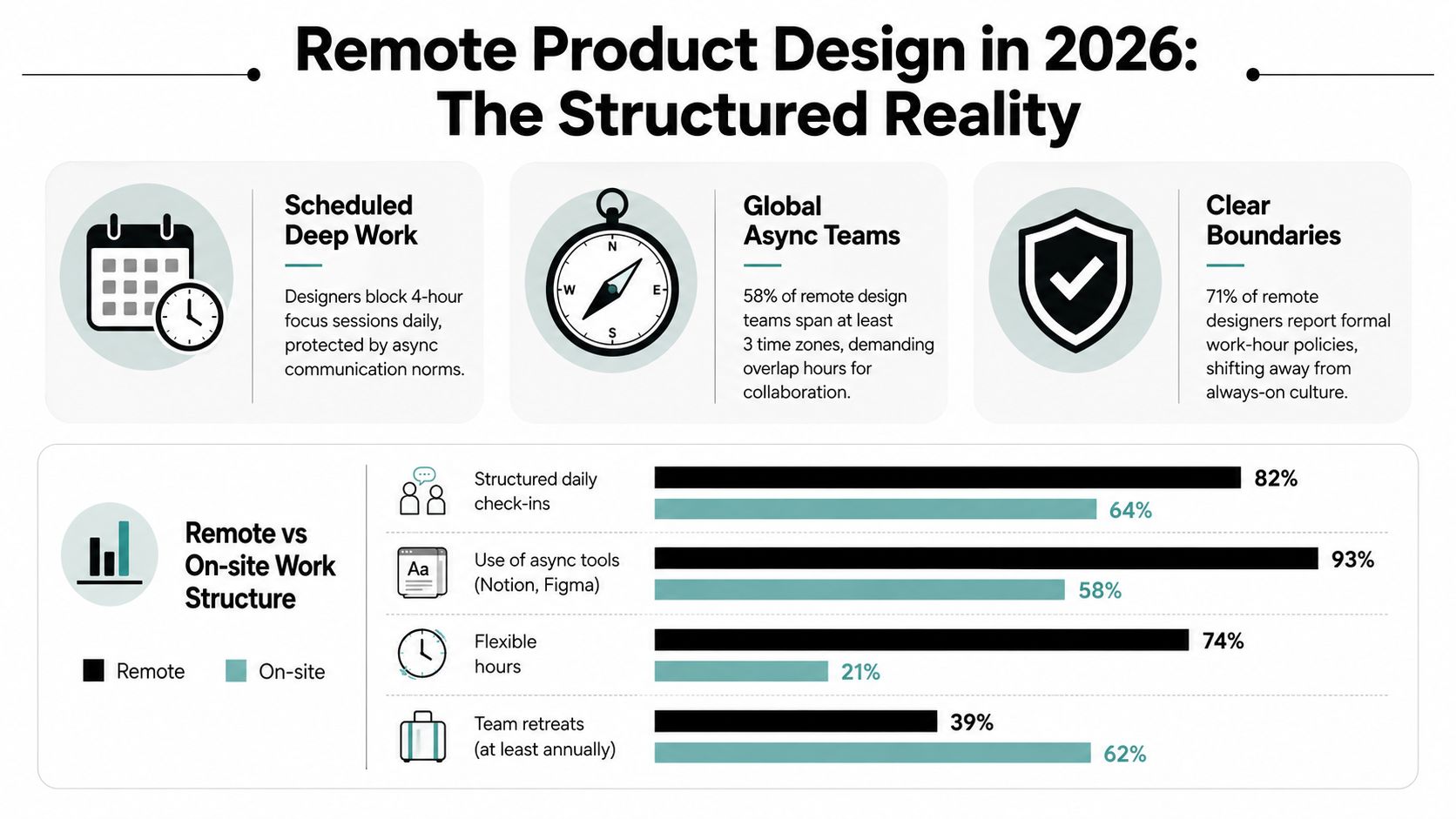
The clearest signal from the current market is that remote work is now normalized, not unusual. A 2025 design-market review put remote jobs at 21% of design hiring, while remote-only roles fell from 30% in 2022 to about 20% by 2025. The same review estimated about 5,053 open design roles and showed the Bay Area holding 16.6% of all open roles, with other hiring hubs including New York, Seattle, Bengaluru, and Tel Aviv. That is why geography still shapes opportunity even when a posting says remote, and why candidates who ignore location rules miss real constraints in the market, as noted in the 2025 design-market review.
That is where many designers misread the room. They optimize for visual polish, but remote teams hire for documentation, collaboration, and the ability to move work forward without a constant live explanation. If you have ever handed off a design and watched the review stall because nobody could follow your reasoning, you already know why remote screens are different.
Remote also means written work, not just visual work
A useful resource for the handoff mindset is mastering design to development handoff, because remote teams care a lot about how clearly you translate intent into implementation-ready decisions. In Web3 and SaaS, that usually means your process lives in written artifacts, Loom walkthroughs, Figma comments, and decision logs, not in a meeting you can rescue with charisma. The designer who gets the interview is not necessarily the one with the prettiest screens, it is the one whose work can survive asynchronous review.
Practical rule: if a portfolio only works when you are in the room to explain it, it is not remote-ready yet.
Remote product design in 2026 is less about freedom from structure and more about operating inside a different structure. Teams still want speed, but they also want clarity, accountability, and enough written proof that someone in another time zone can pick up where you left off. That is why the job hunt starts with market reality, not inspiration.
A remote search also starts with the right place to look. If a company has a remote opening and you want to compare roles that are built for distributed work, the remote product design jobs board is a useful filter because it surfaces listings with the location question already in view.
Where the Remote Product Design Jobs Are
The best listings don't always sit on the biggest boards, and the biggest boards don't always tell you the truth about remote. LinkedIn and Indeed can surface volume, but volume isn't the same thing as fit. A lot of remote product design openings still cluster around major hubs, and many of them are remote within a hiring jurisdiction rather than globally open.
Search where the role type matches the work
Generalist boards are still useful for broad discovery, but niche filters save time when you already know the type of role you want. A focused board like Blockchain Jobs design listings makes it easier to compare design roles alongside adjacent categories in a Web3 context, which matters if you're trying to move between product, design, and protocol-adjacent teams. That kind of search is especially valuable when you want to see whether a company's design work is tied to consumer apps, infrastructure, tokenized products, or internal tools.
The practical move is simple. Use saved searches for remote product designer jobs, then split alerts by location rules, such as remote within country versus global remote. If a board offers a “recently added” feed, check it daily before applying. Freshness matters because remote roles attract broad applicant pools quickly, and stale listings can waste a lot of time.
A 20-minute routine works better than binge-searching for two hours. Spend a few minutes scanning new roles, a few minutes reviewing whether the posting mentions time zones or employment type, and a few minutes tagging companies by fit. That's enough to build a serious pipeline without turning the search into a second job.
Prioritize role types where remote is real
Not every product design title is equally remote-friendly. Web3, SaaS, and AI companies often structure work more naturally around distributed collaboration, while some traditional companies use remote as a convenience layer on top of an in-office culture. You can usually tell from the posting whether the team expects written decision-making, async critique, and regular artifact sharing, or whether “remote” just means you're allowed to log in from somewhere else.
A remote search gets easier when you stop asking, “Is this company remote?” and start asking, “How does this team actually make decisions?”
That question tells you more than the branding on the careers page. If the role reads like a distributed team with real operational habits, it's worth your attention. If it reads like an office job with a laptop shipping policy, keep moving.
Rebuilding Your Portfolio and Resume for Remote Screens
A portfolio that works in an onsite interview can still miss the mark for remote screens, because interviewers cannot rely on a whiteboard, hallway chat, or live context to fill in the gaps. They read each case study as a work sample, a reasoning sample, and a collaboration sample at the same time. The bar shifts, even if the visual craft does not.
Lead with depth, not breadth
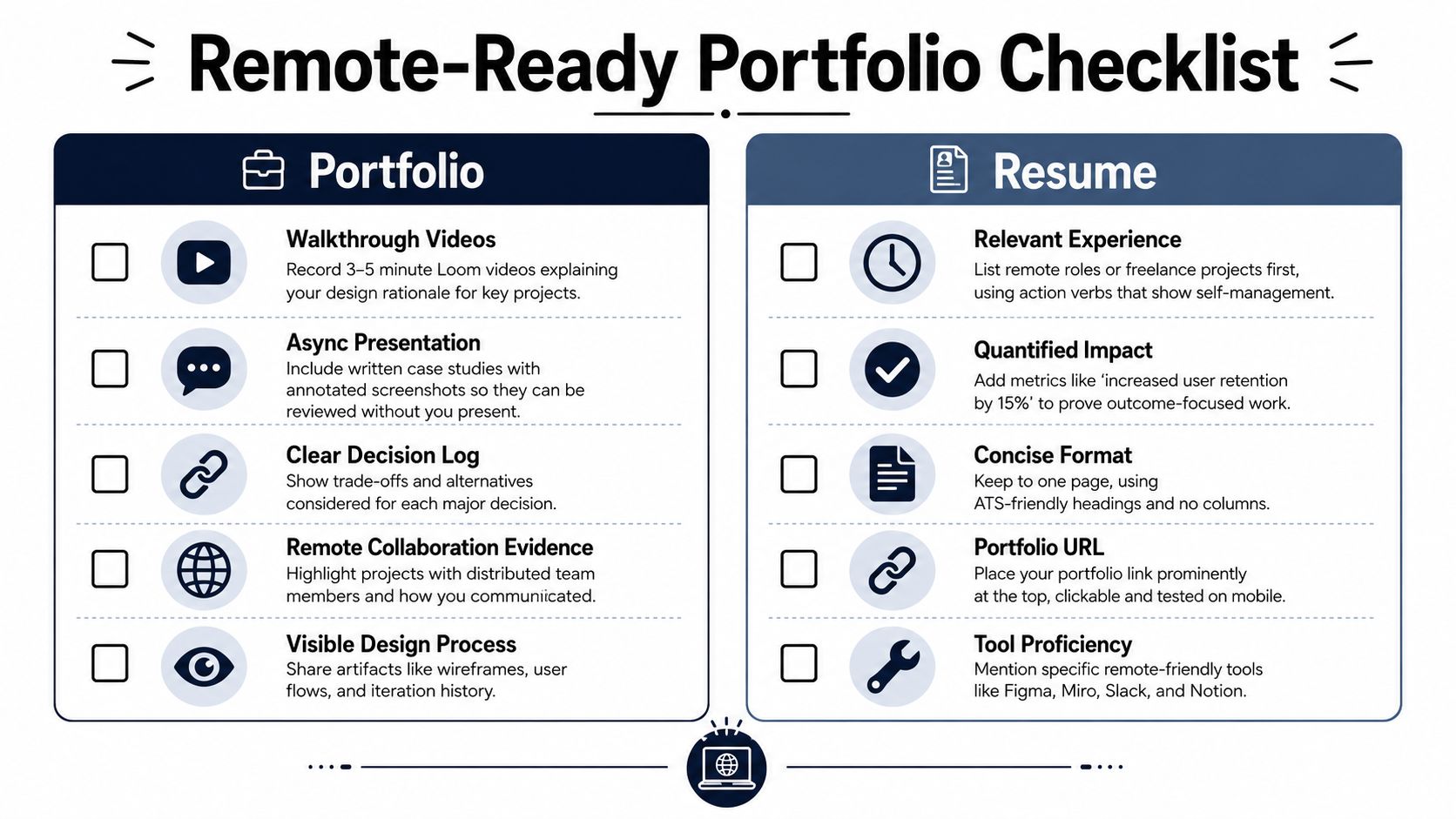
The strongest move is to show 2–3 deep case studies instead of a long gallery of polished screens. Each one should follow a clear problem → discovery → decision → outcome path, and it should stand on its own without you narrating every step live. For remote hiring, the case study has to show trade-offs, the options you rejected, and what changed after launch.
Aim for enough substance that a hiring manager can read the project without a follow-up call just to understand the basics. That usually means room for research notes, iteration history, and a short reflection on what you would do differently next time, but not filler. One good way to pressure-test this is to run it through structured AI mock interviews, then see which decisions still need explanation.
Your portfolio also needs to show the way remote teams work. A Loom walkthrough, annotated screenshots, Figma frames with decision notes, or a written critique log tells a better story than a polished final screen alone. The hiring manager needs proof that you can work asynchronously, not just make something look finished.
Rewrite the resume for collaboration signals
A remote-friendly resume should lead with async collaboration, cross-time-zone work, written artifacts, and partnership with engineering and product management. It also has to be easy to scan. If the strongest evidence sits halfway down page two, you have buried the part that gets you the interview.
Use your first bullets to show how you worked, not only what you shipped. If you have partnered with engineers in Figma, maintained design documentation in Notion, or led written critique threads in Slack, those details belong near the top. They tell a remote hiring manager that you can work without being physically nearby.
The skills section should reflect the tools and habits remote teams expect. In a remote product designer job posting analysis, analysts reviewed 340 remote product designer postings and found that 94% required Figma, 61% required WCAG accessibility knowledge, and 78% required demonstrated cross-functional collaboration with engineering and product management. That means your portfolio and resume need to show design taste, accessibility literacy, and working fluency with PM and engineering, not just clean visual output.
If your resume says you are “passionate about design,” replace that with evidence of remote-ready execution. Show the artifact, the process, and the result. That is what gets read.
Reading Remote Job Postings Before You Apply
A weak application often fails before the first portfolio review. The candidate spent hours on a role that was never compatible with their location, work setup, or employment status. Read the posting like an operations document, not a marketing page.
Run a five-minute pre-application audit
Start with the jurisdiction question. Does the posting say remote, or does it say remote within a country, region, or time zone? If the answer is buried in the fine print, treat that as part of the job. Some roles are distributed, but many are only remote inside a hiring country, and that changes tax, payroll, and eligibility immediately.
Look for schedule language next. A job that pins a Monday-to-Friday rhythm, fixed overlap hours, or traditional benefits is often signaling employee status in a specific jurisdiction, not open-ended global contract work. That matters because the practical meaning of remote can be very different from the aspirational meaning.
A useful check is to ask what the company is really buying. Is it a designer who can work from home inside one legal system, or a designer who can be hired anywhere? The answer changes everything from interview expectations to onboarding. It also changes how you evaluate career growth, because some teams want remote only for convenience while others have built remote into how they staff, review, and promote.
Ask better questions in the first screen
A first recruiter screen should clarify three things quickly. First, whether the company hires employees, contractors, or both. Second, whether the team requires overlap with a specific timezone. Third, whether the role is remote by policy or by habit.
A strong remote screen question sounds direct and professional:
- Country fit: Which countries can this role legally support?
- Schedule fit: What overlap hours does the design team expect?
- Contract terms: Is this employee-only, contractor-only, or flexible?
For a developer-oriented comparison on resume framing, the guide from Resumey.Pro for developers is useful because it reinforces the same idea, remote applications live or die on clarity, specificity, and proof of fit. Design hiring works the same way. If the fine print does not match your life, the role is not a fit, no matter how strong the portfolio looks.
Use the posting itself as a filter. A listing for a senior role such as Product Designer at Jito Foundation is worth reading line by line for the same details you would ask in a screen, where the company can hire, how much overlap it expects, and whether the work is employee-based or contractor-based. That is the difference between a real remote opening and a role that only sounds remote on the surface.
If the recruiter cannot answer basic questions about geography and classification, the role is probably more complex than the posting suggests.
That is the point where many candidates should walk away. A good remote role makes the practical terms legible early. A fuzzy one usually creates frustration later.
Acing the Remote Interview Loop
A remote interview loop tests the same design judgment you'd face in an office, but the signals come through writing, async work, and how clearly you explain decisions without live room energy. That changes the pace, the prep, and what interviewers read as strong communication. If you only rehearse screens, you miss half the filter.
Know the stages before the first call
A remote product design loop usually starts with a recruiter screen, then moves to a hiring-manager conversation, a take-home or async case study, a portfolio walkthrough, cross-functional panels with PM and engineering, and reference checks. The process often takes 3 to 6 weeks, and senior roles can stretch to 8+ weeks, as noted in the remote hiring guide for designers. That timeline is normal when several people need to review your thinking in writing and compare notes across time zones.
| Typical Remote Product Design Interview Stages | |||
|---|---|---|---|
| Stage | Format | What gets evaluated | Typical time investment |
| Recruiter screen | Live call | Role fit, salary alignment, timezone fit | Short intro call |
| Hiring manager | Live or recorded discussion | Depth of thinking, scope, collaboration style | One focused conversation |
| Take-home or async case study | Written and visual deliverable | Problem framing, reasoning, quality of documentation | A few hours of work |
| Portfolio walkthrough | Live presentation | Decision-making, communication, trade-offs | One longer session |
| Cross-functional panel | PM and engineering discussion | Collaboration, pushback handling, async fluency | Several interviews |
| References | Backchannel or formal checks | Reliability, seniority, team impact | Final stage |
Treat the take-home like an async design review, not a school assignment. Time-box the work to the window they gave you, make your assumptions explicit, and include enough context that a PM or engineer can follow the logic even if they disagree with the outcome.
Remote hiring also exposes legal and operational details earlier than many candidates expect. Cross-border classification, country eligibility, and overlap hours can shape the entire loop, so answer those questions for yourself before you invest serious time. If the role depends on a time zone you cannot support, the interview will eventually surface that mismatch.
Present reasoning, not just polish
A lot of remote candidates lose the room because they show only the final screen. That is too thin. Interviewers want to see the research, the options you ruled out, the engineering constraints, and how you handled collaboration in writing.
A structured mock interview can help here, especially if you've spent more time making than explaining. Structured AI mock interviews are useful when you want to rehearse concise answers, tighten your case-study narrative, and pressure-test how clearly you explain trade-offs without drifting. The goal is not to sound scripted. It is to sound prepared.
Practical rule: if your answer to “why this solution?” takes more than a minute to get to the decision, you're probably still narrating the process instead of defending the outcome.
Web3 loops make this even more visible. Teams often want to know how you handle async critique, how you write for a distributed group, and whether you can work through ambiguity without waiting for perfect alignment in a Slack thread. Show the judgment behind the work, not just the final frames.
Negotiating Remote Work Terms and Onboarding Smoothly
Getting an offer isn't the finish line. The remote setup has to work for your life, your legal situation, and your growth path, or the job will feel heavier than it should. Designers often negotiate base salary and stop there. That leaves a lot of value on the table.
Negotiate the full remote package
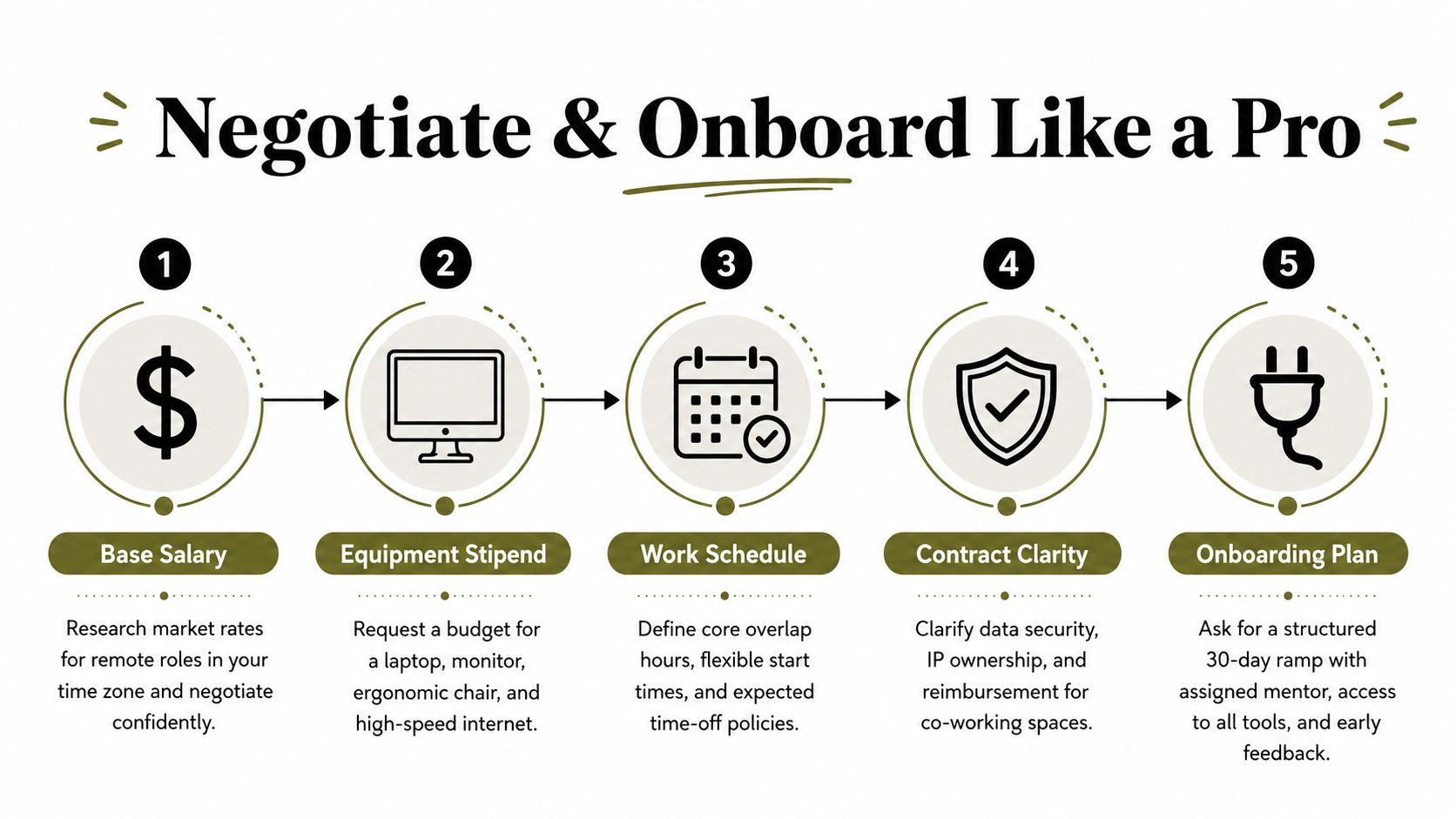
Base pay matters, but so do the terms around it. Ask about equipment, home-office support, co-working reimbursement, off-hours expectations, and whether the company pays differently for specific time zones or legal entities. If the role is contractor-based, the difference between gross compensation and actual take-home can be material, so get the classification in writing.
The salary bands give you a grounded reference point. ZipRecruiter's June 2026 data put the average yearly pay for remote product designers in the United States at $144,360, with most workers earning between $131,000 and $155,000, according to ZipRecruiter remote product designer salary data. Built In reported an average remote Product Designer salary of $147,602 and average total compensation of $162,946, while another remote-focused tracker found a median base pay of $169,000 across 74 employers, with a range of roughly $146,000 to $197,000. Senior roles at $173,000 base and staff roles at $186,000 base show how much room there is for experience to move compensation upward, also reflected in the same salary data set.
That's useful in negotiation because it stops you from anchoring to a lower number than the market already supports. You're not asking for a favor. You're aligning the role to the value and responsibility it carries.
Make onboarding a visibility project
The first 90 days in a remote team are about trust, clarity, and evidence. You want people to see how you think, how you update, and how you handle uncertainty. Written weekly updates help more than long live meetings, especially when the team is spread across time zones.
A good onboarding rhythm includes a mentor, full tool access, documented goals, and early feedback checkpoints. If the manager can't articulate what success looks like by week four, ask them to define it. That question is especially important if you're aiming for future senior or staff growth, because remote visibility doesn't happen by accident.
Ask for your expectations in writing before the confusion starts.
That single habit saves a lot of pain later. It also makes it easier to compare what the team promised with what the team delivers once you join.
Your 90-Day Remote Product Design Job Hunt
A remote job hunt works better when it has a timeline. In the first two weeks, rebuild the portfolio and resume so they fit remote screening. In weeks three through six, focus on sourcing and outreach. In weeks seven through ten, handle interviews and take-home work. In weeks eleven through thirteen, prepare for negotiation and onboarding.
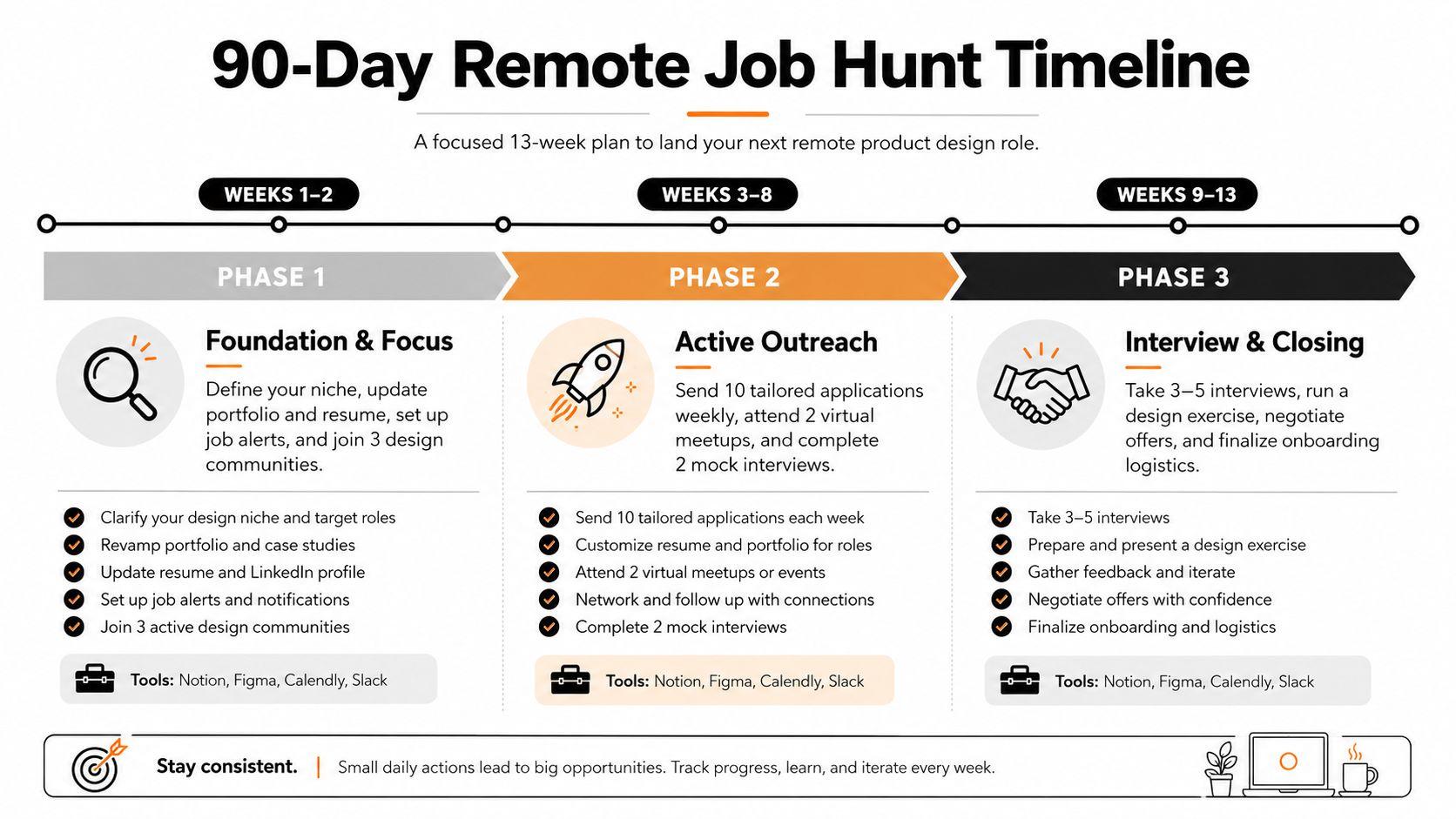
Work the hunt like a product brief
Treat the search as a design project with inputs, iteration, and outcomes. Each week should produce something concrete, a tighter case study, a cleaner resume, a stronger shortlist, or a better interview answer. If a role looks remote but will not say where it can hire, move on early.
The habit that keeps momentum is straightforward. Review new listings, send customized applications, improve one portfolio artifact, and practice one interview story out loud. Keep the search focused enough that you can move quickly, but broad enough that you do not miss roles in Web3, SaaS, or adjacent product teams.
Use these warning signs as a hard filter:
- Vague geography: The role says remote but will not name supported countries.
- Unclear schedule: No overlap hours are listed, and the recruiter dodges the question.
- Weak documentation culture: The posting says nothing about written work, async tools, or cross-functional handoff.
- Classification fog: Employee versus contractor status is not clear before the first interview.
Remote-specific terms are part of the job, especially equipment, stipends, off-hours, and time-zone expectations. So is treating the first 90 days as the period where visibility and trust are either built or lost. Do that well, and you are not just landing a job, you are setting up the next promotion path too.
If you want a cleaner way to find remote product design jobs that match the way you work, Blockchain Jobs is a strong place to start. It is built for people who want remote-friendly listings across Web3 and adjacent product roles, with fresher search paths than broad boards often provide. Use it to compare design openings, pressure-test fit, and move faster on roles that respect the practical demands of remote hiring.